
How SPG99 makes auto-start safe and transparent for applications
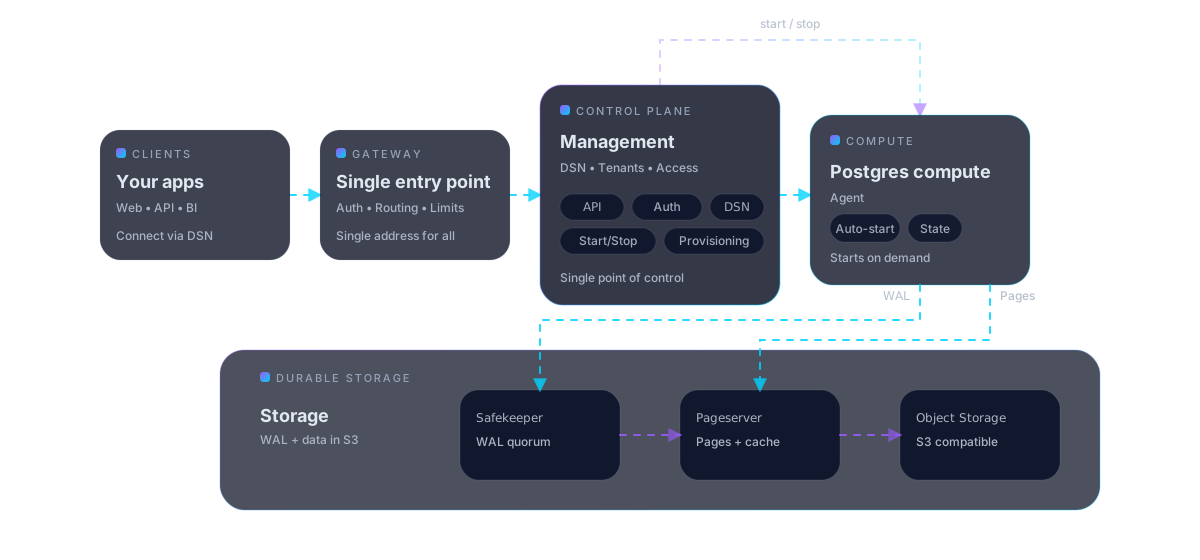
From the outside SPG99 looks like regular PostgreSQL over a standard DSN. Inside, the platform separates the entrypoint, the compute lifecycle, and durable data storage. That is what lets the database sleep safely, start quickly, and survive compute recreation without changing the DSN.
One DSN for applications through Gateway.
Auto-start and auto-stop are normal lifecycle states.
Data survives because it lives outside compute.
Gateway, Control Plane, compute, and the storage layer are split by role
The client always arrives through Gateway. Control Plane decides whether compute must start. Compute executes SQL. Pageserver, Safekeeper, and S3 keep the durable database state. That is why auto-stop is a normal part of the architecture rather than a risky optimization.
Hover a service star or the service name to see the role and boundary.
Tenant and database catalog, access control, lifecycle, and launch orchestration.
Management and observability on top of the same Control Plane API.
Single TLS PostgreSQL endpoint (:5432). Accepts the connection, identifies the database, and triggers auto-start.
Bring up compute and drive PostgreSQL to a ready state.
The working SQL layer. It can be recreated because durable state lives elsewhere.
Receives WAL and provides a durable write path.
Builds storage state and serves basebackup / pages for bootstrap and restart.
Long-lived data and WAL layer in Russia.
For applications, DSN. For platform teams, Console and API
SPG99 intentionally keeps the user-facing surface simple: a standard PostgreSQL endpoint for applications and a Control Plane API for automation. That lets teams fit the service into CI/CD, internal portals, or IaC without a proprietary protocol.
# Control Plane API (v2)
export SPG99_CP_URL="https://<cp-host>/v2"
export SPG99_API_KEY="<api-key>"

# 1) Create a tenant
curl -sS "$SPG99_CP_URL/tenants"   -H "Authorization: Bearer $SPG99_API_KEY"   -H "Content-Type: application/json"   -d '{"name":"acme"}' | jq .

# 2) Create a database (default public level: L1)
curl -sS "$SPG99_CP_URL/tenants/acme/dbs"   -H "Authorization: Bearer $SPG99_API_KEY"   -H "Content-Type: application/json"   -d '{"name":"app"}' | jq .

# 3) Read Gateway DSN for client connections
curl -sS "$SPG99_CP_URL/tenants/acme/dbs/app"   -H "Authorization: Bearer $SPG99_API_KEY"   -H "Content-Type: application/json"   | jq -r '.connection_string'
# Compute lifecycle
# 1) Create the DB once
curl -sS -X POST "$SPG99_CP_URL/tenants/acme/dbs"   -H "Authorization: Bearer $SPG99_API_KEY"   -H "Content-Type: application/json"   -d '{"name":"app"}' | jq .

# 2) The first client connection triggers auto-start
psql 'postgres://<pg_user>:<pg_password>@<gateway-host>:5432/app?sslmode=require'

# 3) Check current state
curl -sS "$SPG99_CP_URL/tenants/acme/dbs/app"   -H "Authorization: Bearer $SPG99_API_KEY" | jq .